
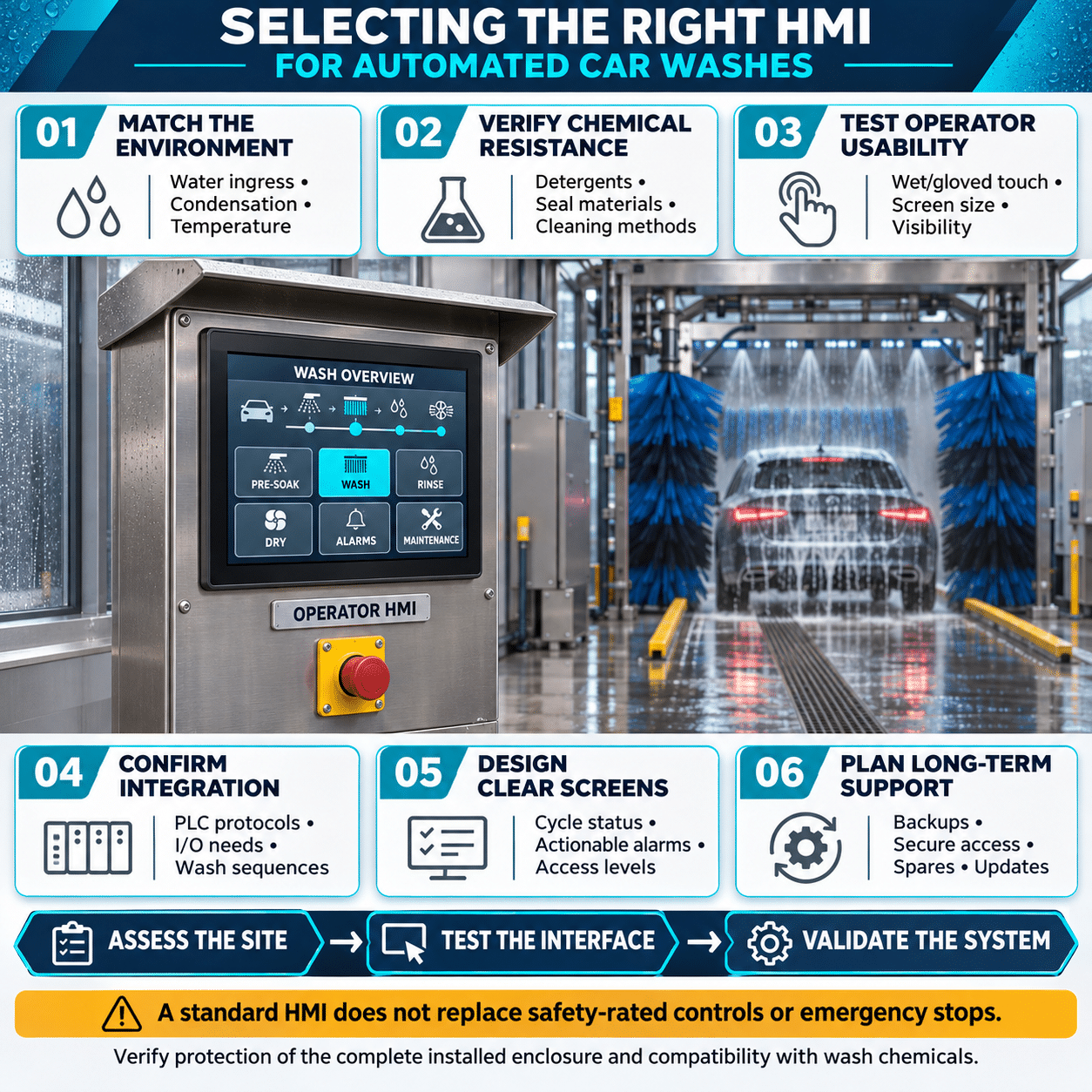
Automated car washes combine conveyors, pumps, blowers, brushes, chemical systems, sensors, valves, and motor-driven equipment into one coordinated process. Operators need a clear way to start the system, select wash programs, monitor vehicle movement, respond to alarms, and troubleshoot equipment without searching through a crowded control cabinet.
A human-machine interface, or HMI, provides that central point of interaction. The right HMI can simplify daily operation, reduce troubleshooting time, improve maintenance planning, and give owners better visibility into wash performance. The wrong HMI may be difficult to use in wet conditions, incompatible with existing controls, or unable to provide the diagnostic information technicians need.
Selecting an HMI for an automated car wash requires careful evaluation of the operating environment, control architecture, operator workflow, communication requirements, data needs, and long-term support strategy.
Begin With the Type of Car Wash
The HMI requirements depend on the type and complexity of the wash system.
In-Bay Automatic Systems
In an in-bay automatic system, the vehicle remains stationary while the wash equipment moves around it. The HMI may control:
- Vehicle-positioning sequences
- Gantry movement
- Brush or touchless wash modes
- High-pressure pumps
- Chemical application
- Rinse and spot-free water systems
- Drying equipment
- Door operation
- Freeze-protection sequences
These systems often need a compact local HMI that provides fast access to operating status, manual controls, and alarm information.
Conveyor and Tunnel Systems
Tunnel washes may contain many coordinated stations and a large number of motors, sensors, and variable frequency drives. The HMI may display:
- Conveyor status and speed
- Vehicle position
- Entrance and exit conditions
- Wash-package selection
- Brush and wrap operation
- Chemical-system status
- Pump and blower performance
- Equipment interlocks
- Production counts
- Fault history
A larger screen and more advanced navigation may be appropriate because the operator must see the condition of the entire tunnel.
Self-Service Wash Bays
An HMI in a self-service application may support equipment setup, utility monitoring, alarm management, and maintenance rather than direct customer operation. The operator interface should be clearly separated from the customer payment terminal and wash-selection panel unless the equipment is specifically designed to perform both functions.
Fleet and High-Volume Wash Systems
Fleet systems may require vehicle identification, custom wash recipes, usage records, remote diagnostics, and communication with facility-management or fleet-management systems.
These applications may benefit from expanded data logging, recipe management, multiple network connections, and user-level security.
Separate the Operator HMI From Safety Functions
The HMI can display safety status and help operators understand why equipment has stopped, but it should not be the only means of performing a safety-critical function.
Emergency stops, guard switches, vehicle-detection devices, personnel-protection sensors, and other safety functions should use appropriately designed and rated safety circuits. A touchscreen button is not a substitute for a hardwired emergency-stop device.
The control system should remain in a safe state if:
- The HMI loses power
- Communication between the HMI and PLC fails
- The screen freezes or restarts
- The Ethernet network becomes unavailable
- An operator enters an incorrect command
- Water damages the operator station
The PLC or dedicated safety controller should execute the machine sequence and safety logic. The HMI should provide commands, settings, visualization, and diagnostics without becoming the sole controller for essential protective functions.
Evaluate the Wash-Bay Environment
A car wash is a challenging location for electronic equipment. The HMI may encounter water spray, detergent, wax, humidity, condensation, dirt, temperature changes, and electrical noise.
Water and Chemical Exposure
The front of the installed HMI should have an environmental rating suitable for the location. Depending on the installation, an IP65, IP66, or comparable enclosure rating may be appropriate.
The rating normally applies only when:
- The HMI is correctly mounted in a suitable enclosure
- The specified waterproof gasket is installed
- The panel cutout is accurate
- Mounting hardware is tightened correctly
- Unused enclosure openings are sealed
- Cables and conduit entries are properly installed
The chemical resistance of the display surface, bezel, gasket, and enclosure should also be reviewed. Presoaks, detergents, tire cleaners, acids, alkaline solutions, waxes, and drying agents may affect materials differently.
A high water-resistance rating does not automatically guarantee compatibility with every cleaning chemical.
Condensation
A sealed panel can still experience condensation if humid air enters the enclosure and temperatures change rapidly. Condensation may occur when equipment cools overnight or when warm, humid air contacts a cold surface.
Possible protective measures include:
- Correctly sealed enclosures
- Drain and breather devices designed for the enclosure
- Anti-condensation heaters
- Controlled panel ventilation
- Proper enclosure placement
- Avoiding direct exposure to high-pressure spray
The HMI specification should distinguish between high humidity and actual condensation. Many electronic devices are rated for humid operation only when condensation does not occur.
Temperature
Outdoor and unconditioned wash locations may experience freezing winters and high summer temperatures. Direct sunlight can raise the temperature of an operator station well above the surrounding air temperature.
Confirm:
- Minimum operating temperature
- Maximum operating temperature
- Storage-temperature range
- Solar exposure
- Heat produced by other panel components
- Required ventilation or heating
- Screen performance at temperature extremes
Installing the HMI under a canopy or sun shield can improve visibility and reduce thermal stress.
Choose the Right Screen Size
The screen must be large enough to present useful information without clutter, but it should also fit the available control station and viewing distance.
A smaller display may be sufficient for:
- A single in-bay machine
- Basic start and stop controls
- Limited equipment status
- A small number of alarms
- Local maintenance functions
A larger display may be preferable for:
- Tunnel overview screens
- Multiple wash stations
- Detailed equipment graphics
- Drive and motor diagnostics
- Trend displays
- Recipe selection
- Maintenance dashboards
Fuji Electric’s MONITOUCH V10 Series includes screen sizes from 8.4 to 15 inches. This allows system designers to apply a consistent HMI platform across compact machines and larger tunnel control stations.
Screen size should not be evaluated independently of resolution. A larger display with insufficient resolution may still limit the amount of information that can be shown clearly.
Design for Wet Hands and Work Gloves
Operators may use the HMI while wearing gloves or while their hands are damp. The touch technology and screen design should support these conditions.
Resistive touchscreens are often suitable for industrial applications because they can generally be operated with a gloved finger or stylus. However, the complete HMI should still be tested with the actual gloves and operating practices used at the wash.
Screen layouts should include:
- Large touch targets
- Adequate spacing between commands
- High-contrast text and symbols
- Clear confirmation for important actions
- Limited use of small pop-up controls
- Consistent navigation buttons
- A visible indication when a command has been accepted
Frequently used buttons should not be placed too close to destructive or maintenance-related commands. A technician should not be able to reset a fault, force an output, or alter a recipe accidentally while attempting to open another screen.
Consider Sunlight, Glare, and Night Operation
An HMI may be readable inside a control room but difficult to see near an open wash entrance. Evaluate the expected lighting conditions at the actual mounting location.
Important display characteristics include:
- Brightness
- Contrast
- Viewing angle
- Anti-glare properties
- Color visibility
- Backlight life
- Adjustable brightness
- Nighttime readability
Color should not be the only method used to communicate status. Combine color with text, symbols, or shapes so that alarms remain understandable under glare or for operators with color-vision limitations.
A useful status convention might include:
- Green with a running symbol for normal operation
- Yellow with text for a warning
- Red with a fault symbol for a shutdown or alarm
- Gray with text for unavailable equipment
Confirm PLC and Controller Compatibility
The HMI must communicate reliably with the car wash PLC, motor drives, temperature controllers, flow devices, and other automation equipment.
Before selecting a model, identify:
- PLC manufacturer and model
- Required communication protocol
- Serial or Ethernet interface
- Number of connected controllers
- Required communication speed
- Existing fieldbus networks
- Future expansion plans
- Remote-access requirements
Automated car washes may combine equipment from several manufacturers. The HMI should support the required drivers without relying on excessive protocol converters or custom gateways.
Fuji Electric MONITOUCH HMIs support connectivity with a broad range of PLCs and industrial devices. Available models provide Ethernet, serial communication, removable storage, USB, and other interface options depending on the selected configuration.
Compatibility should be verified using the exact PLC model, firmware revision, protocol, and HMI driver version.
Plan Drive Integration
Variable frequency drives control many car wash motors, including conveyors, brushes, pumps, arches, and blowers. Connecting the HMI to these drives can give operators and technicians access to useful information.
The HMI may display:
- Motor speed
- Output frequency
- Output current
- Motor load
- Drive temperature
- Operating status
- Warning conditions
- Fault codes
- Accumulated operating time
This information can help distinguish a mechanical problem from an electrical or control problem.
For example, rising brush-motor current may indicate excessive mechanical resistance, poor alignment, a damaged bearing, or incorrect brush pressure. A blower that commands full speed but draws unusually low current may have a broken belt, damaged impeller, or incorrect rotation.
Drive parameters should be protected from unauthorized changes. The operator may need to view drive data without being allowed to change acceleration time, current limits, motor settings, or control modes.
Define the HMI’s Operational Functions
The required functions should be documented before screen development begins.
A car wash HMI may need to support:
- System start and stop
- Automatic and manual operating modes
- Wash-package selection
- Equipment enable and disable controls
- Chemical recipe selection
- Conveyor speed adjustment
- Production counters
- Water and chemical usage
- Alarm display
- Alarm history
- Maintenance reminders
- Manual device operation
- Sensor status
- Drive diagnostics
- Trend graphs
- User login
- Data export
- Remote monitoring
Separating normal operation from maintenance functions makes the interface easier to use and reduces the possibility of unintended changes.
Use Recipes Carefully
Recipe functions allow the system to store settings for different wash packages, vehicle types, seasons, or operating conditions.
A recipe may include:
- Conveyor speed
- Chemical selection
- Application duration
- Brush enable settings
- High-pressure sequence
- Rinse duration
- Wax application
- Dryer operation
- Special fleet requirements
Recipe management can improve consistency, but uncontrolled editing creates risk. Changes to chemical concentration, timing, or equipment position may affect wash quality, operating cost, or vehicle safety.
The HMI should provide:
- Named recipes
- Revision or change tracking
- User-level permissions
- Minimum and maximum limits
- Confirmation before download
- A known default recipe
- Backup and restoration procedures
The PLC should validate important values rather than accepting every HMI entry without checking its range.
Make Alarms Actionable
An alarm screen should tell the operator what happened, where it happened, and what to check next.
A message such as “Fault 37” provides little practical value. A more useful message would identify the affected device and probable condition, such as:
“Conveyor drive fault, motor overload. Inspect conveyor for obstruction, then review drive fault history.”
A well-designed alarm system should include:
- Plain-language descriptions
- Equipment or zone identification
- Date and time
- Active and cleared status
- Acknowledgment status
- Recommended operator response
- Links to relevant diagnostic screens
- Alarm history
- Filtering by equipment or severity
Alarms should be prioritized. A low chemical-level warning should not appear identical to an emergency-stop condition or conveyor fault.
Avoid generating so many nuisance alarms that operators begin ignoring them. Delays, deadbands, and alarm conditions should be selected according to the process.
Include Maintenance and Troubleshooting Screens
A good HMI can reduce downtime by giving technicians direct access to the information they need.
Useful maintenance displays include:
- PLC input and output status
- Sensor state
- Motor and drive status
- Pump operating hours
- Chemical-tank levels
- Filter differential pressure
- Water pressure and flow
- Valve command and feedback
- Equipment cycle counts
- Communication status
- Preventive-maintenance reminders
Manual controls can help technicians test individual devices, but they require safeguards. The system should clearly indicate when it is in manual mode, restrict access to qualified personnel, and apply appropriate interlocks.
Forcing a valve, brush, conveyor, or pump from the HMI should never bypass required safety logic.
Select Appropriate Data-Logging Capabilities
Operating data can help owners understand wash performance and identify developing equipment problems.
Useful records may include:
- Number of vehicles washed
- Wash-package distribution
- Cycle duration
- Conveyor stoppages
- Motor current
- Pump operating hours
- Chemical usage
- Water consumption
- Alarm frequency
- Equipment downtime
- Maintenance events
Historical trends can reveal patterns that are difficult to see from instantaneous readings. A gradual rise in pump current may indicate increasing restriction, while repeated sensor faults at the same time each day may point to sunlight, temperature, or water-spray interference.
Determine:
- Which values must be recorded
- How frequently they should be sampled
- How long records must be retained
- Where the data will be stored
- How data will be exported
- What happens when storage is full
- Whether timestamps remain accurate after a power loss
An HMI with an SD-card slot or other removable storage can simplify log collection and application backups.
Evaluate Remote Monitoring
Remote access can help an equipment manufacturer or service organization diagnose problems without immediately traveling to the wash site.
A remote user may be able to:
- View operating screens
- Review active alarms
- Examine fault history
- Check drive status
- Analyze trends
- Confirm software versions
- Assist on-site maintenance personnel
Remote access should be designed deliberately. Connecting an HMI directly to the public internet is not an appropriate support strategy.
A secure design may include:
- A managed firewall
- Virtual private network access
- Individual user accounts
- Strong authentication
- Role-based permissions
- Encrypted communication
- Session timeouts
- Access logs
- A method for disabling remote access locally
- Separation between business and control networks
Remote viewing and remote control should be treated differently. A service technician may need to observe system status without being allowed to start equipment or force outputs.
Establish User Roles
Not every user should have access to every function.
A practical permission structure might include:
Operator
- Start and stop normal operation
- Select approved wash packages
- View status and alarms
- Acknowledge routine alarms
Supervisor
- Change production settings within approved limits
- Review histories and trends
- Manage basic recipes
- Access performance data
Maintenance technician
- Enter manual mode
- Test devices
- View PLC and drive diagnostics
- Reset approved faults
- Change maintenance settings
System administrator
- Manage accounts
- Modify protected parameters
- Update the HMI application
- Configure communications
- Restore backups
Accounts should be assigned to individuals where practical. Shared passwords make it difficult to determine who changed a setting.
Choose the Correct Power Supply
Industrial HMIs are commonly available with 24 VDC or AC input, depending on the model. The choice should match the control-panel architecture.
A 24 VDC HMI can be powered from the control supply and supported by a DC uninterruptible power supply if required. This may allow the interface to remain available long enough to display faults, save data, or complete an orderly shutdown during a power disturbance.
The power design should account for:
- HMI operating current
- Startup current
- Other loads on the power supply
- Voltage drop
- Grounding
- Surge protection
- Electrical noise
- Required ride-through time
Power and signal wiring should be separated from motor and drive conductors where practical.
Design for Maintainability
The HMI will remain in service longer than many consumer electronic products. Lifecycle planning should therefore be part of the original specification.
Consider:
- Expected product availability
- Availability of replacement units
- Compatibility with future models
- Panel-cutout compatibility
- Configuration-software support
- Application backup procedures
- License requirements
- Availability of cables and accessories
- Technical support
- Ability to migrate an existing project
- Documentation for passwords and network settings
Keep an approved backup of the HMI program, recipes, communication settings, and firmware information. The backup should be stored somewhere other than the HMI itself.
A replacement procedure should explain how to install a new unit, load the application, restore recipes, configure network addresses, and verify operation.
Compare Basic and Advanced HMI Requirements
A smaller or simpler HMI may be appropriate when the system has:
- One PLC
- A limited number of devices
- Basic status and control
- Few recipes
- No remote access
- Minimal historical data
A higher-performance HMI may be justified when the system has:
- Multiple PLCs or controllers
- Many drives and networked devices
- Detailed animated graphics
- Large alarm histories
- Trend displays
- Extensive data logging
- Remote monitoring
- Multiple user levels
- Complex recipes
- Future expansion requirements
The best selection is not always the HMI with the largest screen or most features. It is the unit that supports the required workflow while remaining easy to operate and maintain.
Automated Car Wash HMI Selection Checklist
Before selecting an HMI, document:
- Type of car wash
- Number of controlled stations
- Installation location
- Water and chemical exposure
- Required front-panel rating
- Temperature and humidity range
- Condensation risk
- Screen size and resolution
- Viewing distance
- Glove-use requirements
- PLC manufacturer and protocol
- Number of connected devices
- Drive-integration requirements
- Serial and Ethernet ports
- Required wash recipes
- Alarm and diagnostic functions
- Data-logging needs
- Remote-access requirements
- Cybersecurity controls
- User roles and permissions
- AC or DC power supply
- Product lifecycle and replacement strategy
- Application backup procedure
Selecting a Fuji Electric HMI Platform
Fuji Electric MONITOUCH operator panels are designed for industrial machine control and are available in configurations suited to basic and advanced car wash systems.
The MONITOUCH V10 Series can support demanding applications that require responsive graphics, multiple communication options, data storage, and larger displays. Applicable models offer screen sizes from 8.4 to 15 inches and front-panel protection suitable for washdown environments when installed with the specified waterproof gasket and enclosure arrangement.
For less complex equipment, a compact MONITOUCH configuration may provide the essential status, control, alarm, and communication functions without unnecessary system complexity.
Final selection should be based on the exact model specifications. Screen size, power input, communication ports, wireless capability, environmental rating, certifications, storage options, and supported drivers can vary by model.
A Better Interface Supports a Better Wash Process
An HMI should do more than replace push buttons and indicator lights. It should help operators understand the process, help technicians identify faults, and help owners make informed decisions about maintenance and performance.For an automated car wash, the right HMI combines environmental durability, clear graphics, reliable controller communication, useful diagnostics, controlled remote access, and long-term serviceability. When these requirements are considered together, the operator interface becomes an important part of a safer, more consistent, and more maintainable wash system.