
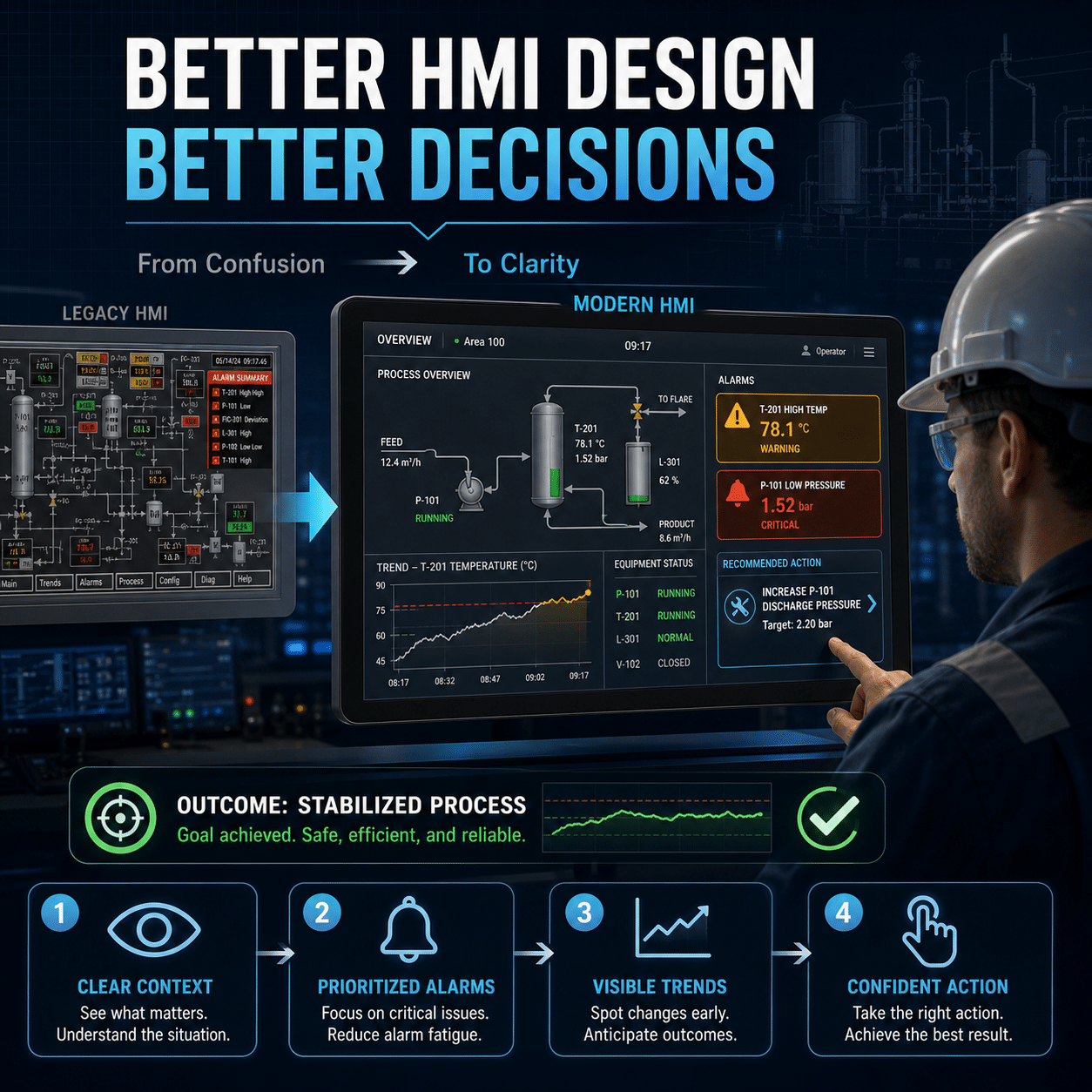
A human-machine interface should do more than display process data. Its real purpose is to help an operator understand what is happening, recognize what requires attention, and choose the correct response.
Many HMIs fall short of that goal. Screens become crowded with colorful equipment graphics, raw numbers, animated objects, and alarms competing for attention. The system may technically show all the necessary information yet still make good decisions unnecessarily difficult.
Better HMI design is not primarily about appearance. It is about reducing cognitive effort, preserving situational awareness, and turning process data into information an operator can act on.
The HMI Is a Decision-Making Tool
Operators rarely use an HMI simply to observe a process. They use it to answer questions:
- Is the process operating normally?
- What has changed?
- Which condition matters most?
- Is performance improving or deteriorating?
- What caused the alarm?
- What action should I take?
- What could happen next?
A useful HMI helps answer those questions quickly and accurately. A poor one forces the operator to search through screens, compare disconnected values, interpret unexplained colors, and reconstruct events from incomplete information.
This distinction becomes especially important during abnormal situations. Under pressure, operators have less time and mental capacity to navigate a confusing interface. Good design supports them when conditions are most demanding.
Start With Normal Operation
An effective overview screen should make normal operation easy to recognize. Operators should be able to look at the display and quickly understand the condition of the process without reading every value.
That requires a clear visual hierarchy. The most important information should be prominent, while secondary detail should remain available without overwhelming the main view.
A strong overview typically communicates:
- Overall operating state
- Production rate or process demand
- Key constraints
- Material or energy flow
- Equipment availability
- Important deviations
- Active high-priority alarms
The screen should emphasize relationships, not merely provide a collection of values. A pressure reading becomes more meaningful when the operator can see its normal range, recent direction, and relationship to upstream and downstream conditions.
Use Color to Communicate Meaning
One of the most common HMI problems is excessive color. Pumps may be green, pipes blue, tanks silver, alarms red, valves yellow, and backgrounds filled with gradients. The screen looks active, but critical conditions do not stand out.
Color works best when it is reserved for information that requires attention.
A neutral visual palette allows abnormal conditions to become immediately visible. For example:
- Gray may indicate normal or inactive equipment.
- White or another neutral tone may represent ordinary process values.
- Yellow or amber may indicate a warning or developing abnormal condition.
- Red may indicate a high-priority alarm requiring prompt action.
- Magenta or another distinct color may indicate a special condition, if consistently defined.
The exact colors matter less than consistency and contrast. Every color should have a defined meaning, and the same meaning should apply across the entire HMI.
Color should not be the only way information is communicated. Text, symbols, shapes, and position should also convey status so the display remains usable by operators with color-vision deficiencies and under poor viewing conditions.
Show Context, Not Just Numbers
A raw value tells the operator what a measurement is. It does not necessarily show whether the value is good, bad, stable, or changing.
Consider a discharge pressure of 82 psi. That number alone raises several questions:
- What is the normal operating range?
- Is 82 psi close to an alarm threshold?
- Was the pressure 60 psi five minutes ago?
- Is the controller trying to reduce it?
- Are upstream and downstream pressures changing too?
- Is the reading reliable?
Context can be added through:
- Normal operating ranges
- Alarm and trip limits
- Setpoints
- Rate-of-change indicators
- Deviation from target
- Recent trends
- Comparison with related values
- Sensor-quality indicators
Small embedded trends are particularly useful. They allow operators to distinguish a stable condition from a developing problem without leaving the current screen.
Design Around Operator Tasks
HMIs are often organized around the control-system architecture rather than the operator’s work. Screens may correspond to PLC programs, remote I/O panels, or equipment numbers that make sense to the engineering team but not to the person operating the process.
A better design begins with actual operating tasks.
Typical tasks include:
- Starting and stopping a production unit
- Changing product or operating mode
- Responding to an alarm
- Recovering after a trip
- Balancing flows
- Maintaining quality
- Isolating equipment for maintenance
- Diagnosing poor performance
Each task requires a particular set of information and controls. Those elements should be grouped so the operator can complete the task without unnecessary navigation or memorization.
This does not mean placing everything on one screen. It means presenting the right information at the right level of detail.
Build a Clear Display Hierarchy
A hierarchical screen structure helps operators move from general awareness to specific diagnosis.
Level 1: Process overview
The highest-level display summarizes the health and performance of the entire operation. It should reveal where attention is needed without requiring the operator to inspect every area.
Level 2: Area or unit display
This level shows a process area, production cell, utility system, or major equipment group. It provides enough detail to understand interactions and locate the source of a problem.
Level 3: Equipment detail
Equipment displays provide operating states, commands, permissives, interlocks, feedback signals, and relevant process measurements for a specific asset.
Level 4: Diagnostic and support information
Detailed trends, alarm history, tuning parameters, maintenance data, and diagnostic logic belong at this level.
Operators should be able to reach relevant detail in a small number of predictable actions. When every screen has a different navigation pattern, valuable time is lost during abnormal events.
Make Equipment States Unambiguous
A motor graphic that changes color may not provide enough information. Does green mean running, available, selected, or healthy? Does gray mean stopped, disabled, or communications failure?
Important equipment states should be stated explicitly. Depending on the asset, these may include:
- Running
- Stopped
- Starting
- Stopping
- Available
- Unavailable
- Local control
- Remote control
- Manual mode
- Automatic mode
- Interlocked
- Tripped
- Maintenance override active
- Communications unavailable
Commands and feedback must also be visually distinct. An operator should not confuse a requested state with a confirmed physical state.
For example, “start command active” is not the same as “motor running.” Displaying both signals clearly helps reveal failed starts, field-device faults, and control-sequence problems.
Explain Why Equipment Cannot Start
A disabled Start button tells the operator very little. It creates uncertainty and often leads to unnecessary calls to maintenance or engineering.
A better interface identifies the unmet permissives and active interlocks preventing operation.
For example:
Pump unavailable
- Suction valve not proven open
- Tank level below minimum
- Motor overload not reset
This changes the HMI from a control panel into a diagnostic aid. It helps the operator understand the system’s logic and correct the condition without guessing.
The same principle applies to automatic sequences. The display should show the current step, completed conditions, outstanding requirements, and reason for any delay.
Improve Alarm Quality, Not Just Alarm Visibility
An alarm is a request for operator action. If no response is required, the event may belong in a log or status display instead.
Poorly managed alarm systems frequently produce:
- Repeated alarms for the same condition
- Alarms with unclear descriptions
- Alarm floods during trips
- Low-value alarms competing with serious events
- Stale alarms that remain active indefinitely
- Alarms without an expected operator response
A better alarm presentation provides:
- Clear description of the abnormal condition
- Location or affected equipment
- Priority based on consequence and response time
- Time of occurrence
- Current alarm state
- Acknowledgment state
- Relevant operating context
- Recommended response or access to guidance
During an alarm flood, the first alarm may be more informative than the dozens that follow. Sequence-of-events data and time synchronization can therefore be crucial when diagnosing the initiating cause.
Prioritize Alarms by Consequence
Everything cannot be a high-priority alarm. When too many events receive the same urgent treatment, priority loses its meaning.
Alarm priority should reflect factors such as:
- Potential consequence
- Time available for response
- Operator action required
- Likelihood that the condition will escalate
A critical safety or environmental condition should be visually and audibly distinct from a minor process deviation.
Alarm settings should also account for process behavior. Appropriate deadbands, delays, suppression logic, and state-based alarming can reduce alarms caused by measurement noise, normal transitions, or equipment that is intentionally out of service.
Use Trends to Support Early Intervention
Operators make better decisions when they can see direction, not just current state.
A rising bearing temperature may still be below its alarm limit, but its trend could indicate a developing failure. A tank level may be within range but approaching a constraint faster than the downstream process can respond.
Useful trends should:
- Include meaningful time ranges
- Show units and scale clearly
- Display setpoints and limits
- Use consistent signal identification
- Allow related values to be compared
- Avoid misleading automatic scaling
- Provide enough history to identify patterns
Preconfigured trends for common troubleshooting scenarios are often more useful than requiring operators to build a new chart during an event.
Reduce Memory Burden
Operators should not have to memorize tag numbers, alarm codes, color meanings, or hidden navigation paths.
The HMI can reduce memory demands by providing:
- Plain-language equipment names
- Consistent symbols
- Familiar units
- Visible mode and status information
- Accessible alarm-response guidance
- Explanations for disabled controls
- Clear confirmation of completed commands
- Standard screen layouts
Consistency is particularly important. If a symbol, color, or interaction has one meaning on one screen and a different meaning elsewhere, the operator must pause and reinterpret it.
Prevent Errors Without Slowing Routine Work
HMI design should make dangerous mistakes difficult while keeping normal actions efficient.
Useful safeguards include:
- Confirmation for high-consequence commands
- Clear identification of the selected equipment
- Display of relevant process conditions before an action
- Appropriate user-access levels
- Limits on invalid entries
- Distinction between automatic and manual control
- Visible indication of bypasses and overrides
- Feedback showing whether a command succeeded
Not every button needs a confirmation dialog. Excessive confirmation creates “click-through” behavior in which operators approve messages without reading them. Confirmation should be reserved for actions with meaningful consequences.
Manage Overrides and Bypasses Carefully
Overrides are sometimes necessary for maintenance, testing, or abnormal operation, but they can weaken safeguards and create hidden risk.
The HMI should make every active override obvious and provide:
- The affected signal or function
- The substituted value or forced state
- The person or role responsible
- The reason for the override
- The time it was applied
- Any expiration requirement
- The consequences of leaving it active
Overrides should remain visible at relevant levels of the display hierarchy. They should not disappear into a maintenance screen that operators rarely open.
Account for Workload and Stress
An interface that seems clear during a quiet design review may become difficult to use during a plant upset.
Under stress, people may:
- Narrow their attention
- Overlook subtle changes
- Have difficulty recalling procedures
- Focus on the first apparent cause
- Misread similar controls
- Repeat ineffective actions
Good HMI design accounts for those predictable human limitations. It highlights what changed, organizes information by priority, provides diagnostic context, and makes system state explicit.
The goal is not to remove the operator from the decision. It is to give the operator a more accurate mental model of the process.
Involve Operators in the Design
Operators understand the practical demands of the process in ways that drawings and control narratives may not capture. They know which values are compared during a startup, which alarms tend to arrive together, which screens slow down troubleshooting, and which abnormal conditions are hardest to recognize.
Their participation should extend beyond final approval. Operators can contribute during:
- Task analysis
- Early screen sketches
- Navigation design
- Alarm rationalization
- Prototype reviews
- Scenario-based testing
- Post-startup evaluation
Feedback should come from multiple shifts and experience levels. An interface that works for the most experienced operator may still be difficult for a new operator to learn.
Test With Realistic Scenarios
A screen is not validated simply because every value updates and every button works.
Effective HMI testing asks operators to respond to realistic situations such as:
- A gradual loss of process performance
- A failed motor start
- A sensor drifting toward an alarm
- A valve command without position feedback
- Multiple alarms after an equipment trip
- A communications failure
- A blocked permissive
- A process restart after an interruption
The test should evaluate whether the operator can detect the condition, understand its significance, find the cause, and take the correct action within the available time.
Unnecessary navigation, misunderstood symbols, missed warnings, and incorrect actions reveal design problems that functional testing alone may not find.
Measure Whether the HMI Is Working
HMI improvement should continue after commissioning. Useful performance measures include:
- Time required to detect abnormal conditions
- Time required to identify the cause
- Frequency of incorrect control actions
- Alarm rate per operator
- Number of standing alarms
- Peak alarm rate during process upsets
- Frequency of bypass or override use
- Operator navigation patterns
- Recurring requests for engineering assistance
Interviews and shift observations can reveal problems that system logs miss. Operators may avoid a confusing screen, rely on handwritten notes, or use external spreadsheets to compensate for missing HMI functionality.
Those workarounds are valuable clues about where the interface is failing.
A Practical Improvement Strategy
Organizations do not always need to replace the entire HMI to make meaningful progress. Improvement can be staged.
1. Identify high-consequence tasks
Start with activities in which a poor decision could affect safety, quality, production, or equipment reliability.
2. Observe real operator behavior
Watch how operators navigate, compare values, respond to alarms, and recover from trips. Record where they hesitate or seek information outside the HMI.
3. Simplify the visual language
Standardize colors, symbols, status labels, units, navigation, and equipment faceplates.
4. Add context to critical values
Show limits, targets, deviations, trends, and related measurements.
5. Improve alarm performance
Remove low-value alarms, rationalize priorities, address recurring alarm floods, and connect alarms to meaningful response guidance.
6. Expose control logic clearly
Display permissives, interlocks, sequence steps, and command-versus-feedback status.
7. Validate with scenarios
Test the revised design using real operating situations and refine it based on observed performance.
8. Maintain governance
Establish standards and review processes so future projects do not gradually reintroduce inconsistency and clutter.
The Bottom Line
Better operator decisions begin with better information, not simply more information.
An effective HMI makes normal operation recognizable, abnormal conditions prominent, equipment states unambiguous, and corrective actions easier to determine. It uses color deliberately, gives values meaningful context, organizes displays around operator tasks, and turns alarms into actionable information.
The best HMI does not demand constant interpretation. It helps the operator see what matters, understand why it matters, and act with confidence before a small deviation becomes a major event.